
Render Passes
카테고리: Metal
Main Reference
- Metal by Tutorials - 4th edition
지금까지는 하나의 render pass만을 사용했는데, 다른 말로 하면 하나의 render command encoder만을 사용했다는 의미이다. 조금만 더 복잡한 작업을 수행하려고 하면 offscreen texture에 렌더해야하는 상황이 자주 발생하며, offscreen render의 결과를 뒤에 등장하는 pass에서 사용하게 된다.
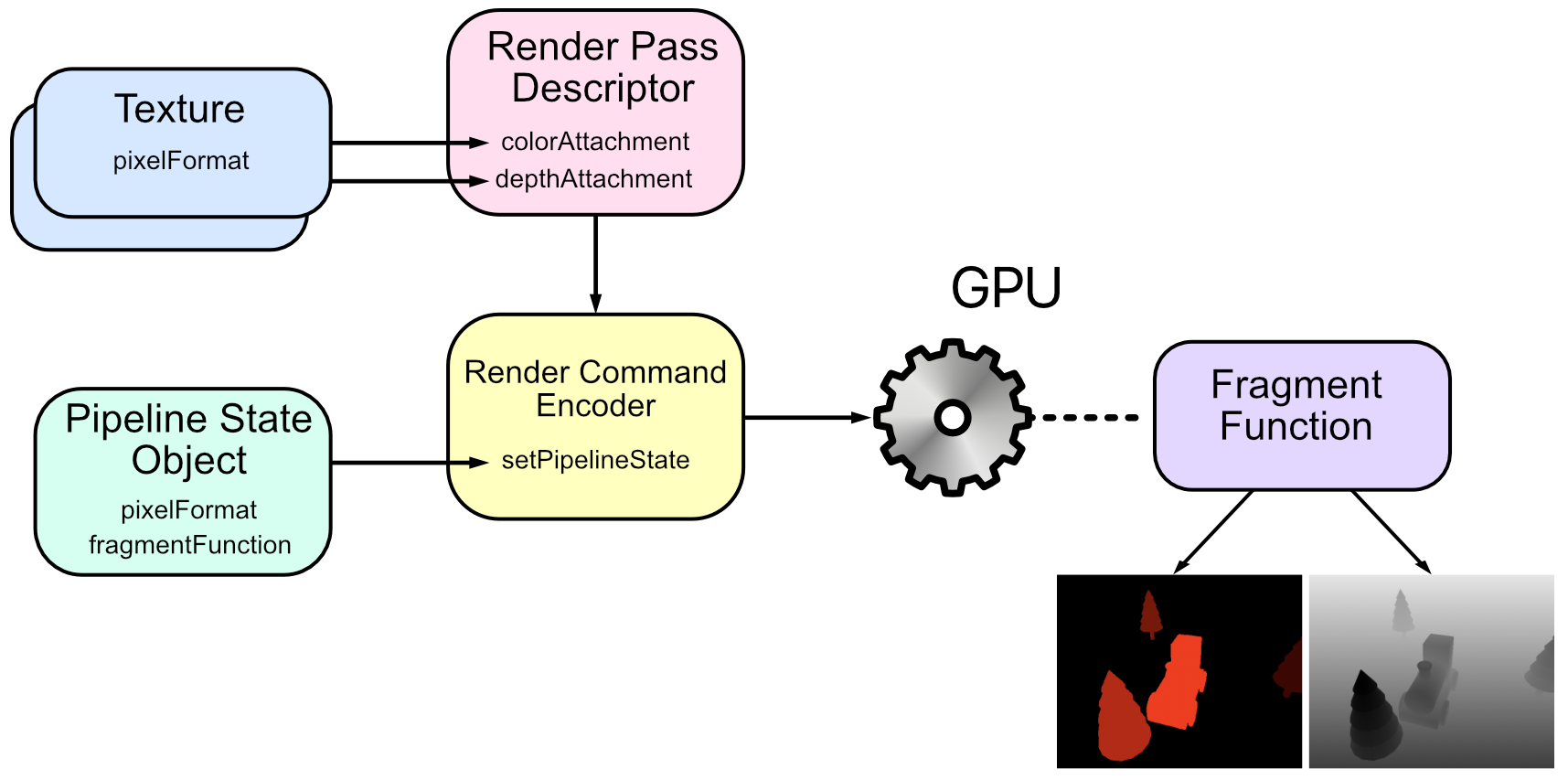
Render command encoder를 세팅하기 위해서는 render pass descriptor가 필요하다. 기존 프로젝트에서는 MTKView.currentRenderPassDescriptor 를 사용했는데, offscreen texture에 렌더링 하기 위해서는 직접 descriptor를 정의해야 한다.
- Render Pass : Frame Buffer(where) + Pipeline State (how)
protocol RenderPass {
    var label: String { get }
    var descriptor: MTLRenderPassDescriptor? { get set }
    mutating func resize(view: MTKView, size: CGSize)
    func draw(
        commandBuffer: MTLCommandBuffer,
        scene: GameScene,
        uniforms: Uniforms,
        params: Params
    )
}

extension RenderPass {
    static func buildDepthStencilState() -> MTLDepthStencilState? {
        let descriptor = MTLDepthStencilDescriptor()
        descriptor.depthCompareFunction = .less
        descriptor.isDepthWriteEnabled = true
        return Renderer.device.makeDepthStencilState(
            descriptor: descriptor)
    }
}
- Offscreen Texture를 사용할 경우 window 크기에 맞춰주는 resize 함수가 필요
mtkView(size)호출할 때 각 Pass의 resize 함수를 호출- 사실 resize가 필요 없는 Pass들도 존재(ex. shadow pass)
- 이런 경우 구현부를 비워두면 됨
- DepthStencil State는 RenderPass에서 생성하는 구조..
- 다수의 renderPass가 default PSO를 사용하기 때문에 효율적임
enum PipelineStates {
    static func createPSO(descriptor: MTLRenderPipelineDescriptor)
    -> MTLRenderPipelineState {
    let pipelineState: MTLRenderPipelineState
    do {
      pipelineState =
      try Renderer.device.makeRenderPipelineState(
        descriptor: descriptor)
    } catch {
      fatalError(error.localizedDescription)
    }
    return pipelineState
    }

    static func createForwardPSO(colorPixelFormat: MTLPixelFormat) -> MTLRenderPipelineState {
    let vertexFunction = Renderer.library?.makeFunction(name: "vertex_main")
    let fragmentFunction = Renderer.library?.makeFunction(name: "fragment_main")
    let pipelineDescriptor = MTLRenderPipelineDescriptor()
    pipelineDescriptor.vertexFunction = vertexFunction
    pipelineDescriptor.fragmentFunction = fragmentFunction
    pipelineDescriptor.colorAttachments[0].pixelFormat = colorPixelFormat
    pipelineDescriptor.depthAttachmentPixelFormat = .depth32Float
    pipelineDescriptor.vertexDescriptor =
      MTLVertexDescriptor.defaultLayout
    return createPSO(descriptor: pipelineDescriptor)
    }

    static func createObjectIdPSO() -> MTLRenderPipelineState {
        let pipelineDescriptor = MTLRenderPipelineDescriptor()
        let vertexFunction =
        Renderer.library?.makeFunction(name: "vertex_main")
        let fragmentFunction =
        Renderer.library?.makeFunction(name: "fragment_objectId")
        pipelineDescriptor.vertexFunction = vertexFunction
        pipelineDescriptor.fragmentFunction = fragmentFunction
        pipelineDescriptor.colorAttachments[0].pixelFormat = .r32Uint
        pipelineDescriptor.depthAttachmentPixelFormat = .invalid
        pipelineDescriptor.vertexDescriptor =
        MTLVertexDescriptor.defaultLayout
        return Self.createPSO(descriptor: pipelineDescriptor)
    }
}
- Pipeline State는 case가 없는 enum으로 관리 (static func로만 이루어져 있음)
- PipelineState.Create…PSO() 처럼 namespace로 깔끔하게 사용 가능
- class나 struct 처럼 PipelineState 객체를 생성할 수 없음
- IS Engine 구조보다 훨씬 깔끔하다..
- colorAttachment(+ depth)의 pixelFormat을 Descriptor에서 지정하는데 renderTexture의 pixelFormat과 동일해야 함
- Factory 패턴!
extension RenderPass {
	// ...

    static func makeTexture(
        size: CGSize,
        pixelFormat: MTLPixelFormat,
        label: String,
        storageMode: MTLStorageMode = .private,
        usage: MTLTextureUsage = [.shaderRead, .renderTarget]
    ) -> MTLTexture? {
        let width = Int(size.width)
        let height = Int(size.height)
        guard width > 0 && height > 0 else { return nil }
        let textureDesc =
        MTLTextureDescriptor.texture2DDescriptor(
            pixelFormat: pixelFormat,
            width: width,
            height: height,
            mipmapped: false)
        textureDesc.storageMode = storageMode
        textureDesc.usage = usage
        guard let texture =
                Renderer.device.makeTexture(descriptor: textureDesc) else {
            fatalError("Failed to create texture")
        }
        texture.label = label
        return texture
    }
}

struct ObjectIdRenderPass: RenderPass {
    let label = "Object ID Render Pass"
    var descriptor: MTLRenderPassDescriptor?
    var pipelineState: MTLRenderPipelineState

    var idTexture: MTLTexture?

    mutating func resize(view: MTKView, size: CGSize) {
        idTexture = Self.makeTexture(
            size: size,
            pixelFormat: .r32Uint,
            label: "ID Texture")
    }

    func draw(
        commandBuffer: MTLCommandBuffer,
        scene: GameScene,
        uniforms: Uniforms,
        params: Params
    ) {
        guard let descriptor = descriptor else {
            return
        }
        descriptor.colorAttachments[0].texture = idTexture
        guard let renderEncoder =
                commandBuffer.makeRenderCommandEncoder(descriptor: descriptor)
        else { return }

        renderEncoder.label = label
        renderEncoder.setRenderPipelineState(pipelineState)
        for model in scene.models {
            model.render(
                encoder: renderEncoder,
                uniforms: uniforms,
                params: params)
        }
        renderEncoder.endEncoding()
    }

    init() {
        pipelineState = PipelineStates.createObjectIdPSO()
        descriptor = MTLRenderPassDescriptor()
    }

}
- IS Engine에서는 Texture class가 device도 들고있는데, 굳이 들고 있을 필요가 있을까..?
- Texture의 경우 resize 함수에서 rebuild되도록
- 만약 size가 변경되어도, 이전에 사용하던 MTLTexture 리소스는 자동으로 해제되고
- 새로운 MTLTexture 생성
-
참고로 맨 처음 mtkView window가 초기 size로 켜질 때 resize로 간주하고 호출됨
- 그리고 renderEncoder를 renderPass에서 생성하고 endEncoding하는 구조..
- 괜찮아 보이는데 이런 식이면 triple buffering같은 기법을 사용하기는 힘들듯
class Renderer: NSObject {
  static var device: MTLDevice!
  static var commandQueue: MTLCommandQueue!
  static var library: MTLLibrary!

  var uniforms = Uniforms()
  var params = Params()

  var forwardRenderPass: ForwardRenderPass
  var objectIdRenderPass: ObjectIdRenderPass

  init(metalView: MTKView) {
    guard
      let device = MTLCreateSystemDefaultDevice(),
      let commandQueue = device.makeCommandQueue() else {
        fatalError("GPU not available")
    }
    Self.device = device
    Self.commandQueue = commandQueue
    metalView.device = device

    // create the shader function library
    let library = device.makeDefaultLibrary()
    Self.library = library

    forwardRenderPass = ForwardRenderPass(view: metalView)
    objectIdRenderPass = ObjectIdRenderPass()

    super.init()
    metalView.clearColor = MTLClearColor(
      red: 0.93,
      green: 0.97,
      blue: 1.0,
      alpha: 1.0)
    metalView.depthStencilPixelFormat = .depth32Float
    mtkView(
      metalView,
      drawableSizeWillChange: metalView.drawableSize)

    // set the device's scale factor
#if os(macOS)
    params.scaleFactor = Float(NSScreen.main?.backingScaleFactor ?? 1)
#elseif os(iOS)
    params.scaleFactor = Float(UIScreen.main.scale)
#endif

  }

  static func buildDepthStencilState() -> MTLDepthStencilState? {
    let descriptor = MTLDepthStencilDescriptor()
    descriptor.depthCompareFunction = .less
    descriptor.isDepthWriteEnabled = true
    return Renderer.device.makeDepthStencilState(
      descriptor: descriptor)
  }
}

extension Renderer {
  func mtkView(
    _ view: MTKView,
    drawableSizeWillChange size: CGSize
  ) {
    forwardRenderPass.resize(view: view, size: size)
    objectIdRenderPass.resize(view: view, size: size)

  }

  func updateUniforms(scene: GameScene) {
    uniforms.viewMatrix = scene.camera.viewMatrix
    uniforms.projectionMatrix = scene.camera.projectionMatrix
    params.lightCount = Int32(scene.lighting.lights.count)
    params.cameraPosition = scene.camera.position
  }

  func draw(scene: GameScene, in view: MTKView) {
    guard
      let commandBuffer = Self.commandQueue.makeCommandBuffer(),
      let descriptor = view.currentRenderPassDescriptor else {
        return
    }

    updateUniforms(scene: scene)

	objectIdRenderPass.draw(
		commandBuffer: commandBuffer,
		scene: scene,
		uniforms: uniforms,
		params: params)

    forwardRenderPass.descriptor = descriptor
    forwardRenderPass.draw(
      commandBuffer: commandBuffer,
      scene: scene,
      uniforms: uniforms,
      params: params)

    guard let drawable = view.currentDrawable else {
      return
    }
    commandBuffer.present(drawable)
    commandBuffer.commit()
  }
}
- Renderer 클래스에 ObjectidRenderPass 추가해주면 됨
- 이때 어떤 함수들은 class 구현부에 있고, 어떤 함수들은 extension으로 빼둠
- 보통 가독성을 위해 protocol 단위로 extension으로 나누기도 함.
- renderer의 경우 mtkView의 MTKViewDelegate protocol을 위한 함수들이 빠져있음
struct GameScene {
  static var objectId: Int32 = 1
  lazy var train: Model = {
    createModel(name: "train.usdz")
  }()
  lazy var treefir1: Model = {
    createModel(name: "treefir.usdz")
  }()
  lazy var treefir2: Model = {
    createModel(name: "treefir.usdz")
  }()
  lazy var treefir3: Model = {
    createModel(name: "treefir.usdz")
  }()

    func createModel(name: String) -> Model {
    let model = Model(name: name, objectId: Self.objectId)
    Self.objectId += 1
    return model
  }

  // ...
}
- object ID는 gameScene에서 관리하니까 훨씬 편하네..
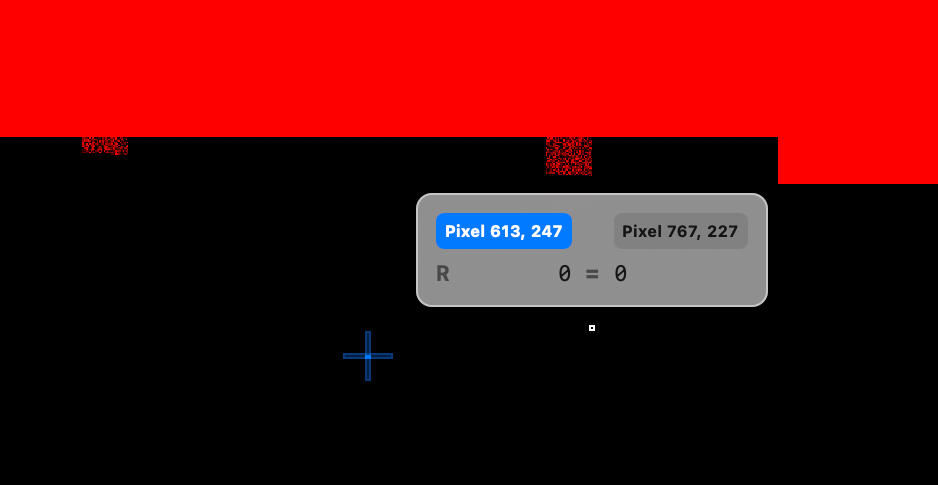
GPU Capture로 idTexture를 찍어보면 잘못된 결과가 나오는데, Depth Testing을 하지 않아서 그럼. 사실 loadAction의 clear 설정까지 반드시 해줄 필요는 없지만, 추후 디버깅이나 후처리를 위해 해주는게 좋음
Reading the Object ID Texture
Option 1 (Read the texture on the CPU)
- extract the object ID using the touch location as the coordinates.
- synchronization issues
Option 2
- Keep the texture on the GPU and do the test there
fragment float4 fragment_main() {
	// ...

	if (!is_null_texture(idTexture)) {
	    uint2 coord = uint2(
	                        params.touchX * params.scaleFactor,
	                        params.touchY * params.scaleFactor);
	    uint objectID = idTexture.read(coord).r;
	    if (params.objectId != 0 && objectID == params.objectId) {
	        material.baseColor = float3(0.9, 0.5, 0);
	    }
	}
}
댓글 남기기