
3D Model
카테고리: Metal
Main Reference
- Metal by Tutorials - 4th edition
3D Models
Blender나 Maya 같은 3D Modeling 앱에서는 mesh를 이루는 기본 primitive는 triangle이 아니라 quad 인 경우가 많다. Quad primitive의 경우 subdivision이나 smoothing algorithm 등이 잘 작동한다는 장점이 있다. 하지만 Metal rendering의 기본 단위는 triangle이기 때문에 Model I/O 프레임워크가 이를 변환해준다.
MDLMesh(Model I/O): 3D 모델의 모든 정보를 담고 있는 범용 설계도입니다. CPU 메모리에 존재하며, 특정 GPU 기술에 종속되지 않음.MTKMesh(MetalKit):MDLMesh를 바탕으로, Metal GPU가 렌더링에 직접 사용할 수 있도록 최적화하여 만든 실제 부품입니다. GPU 메모리에 존재하는 버퍼들을 관리.
3D File Formats
- obj : mtl로 texture나 property를 지정할 수 있지만, 애니메이션을 지원하지 않음 (wavefront 개발)
- glTF : Khronos에서 개발. 애니메이션 지원
- fbx : 애니메이션 지원, autodesk가 독점 소유, 단일 표준 x (저물어가는 추세)
- USD : Universal Scene Description - pixar 도입. 여러 모델과 파일을 참조할 수 있어서 여러 사람이 개별적으로 작업 가능
- .usda = USD + ASCII (텍스트)
- .usdc : USD + Crate (바이너리)
- .usdz : USD + Zip (압축 패키지)
Vertex Descriptor
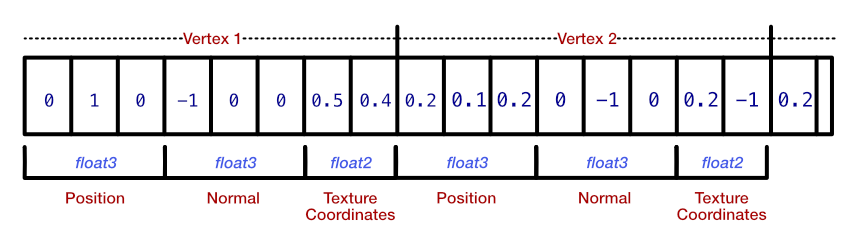
// 버퍼 0: 정적 데이터 (변하지 않음)
struct StaticVertexData {
    var position: simd_float3    // 위치
    var normal: simd_float3      // 법선
    var texCoord: simd_float2    // UV 좌표
}

// 버퍼 1: 동적 데이터 (매 프레임 변함)
struct DynamicVertexData {
    var color: simd_float4       // 색상 (애니메이션)
    var instanceMatrix: matrix_float4x4  // 인스턴스 변환
}


let vertexDescriptor = MTLVertexDescriptor()

// 버퍼 0의 attribute들 (정적 데이터)
vertexDescriptor.attributes[0].format = .float3 // position
vertexDescriptor.attributes[0].bufferIndex = 0 vertexDescriptor.attributes[0].offset = 0

vertexDescriptor.attributes[1].format = .float3 // normal
vertexDescriptor.attributes[1].bufferIndex = 0 vertexDescriptor.attributes[1].offset = 12

vertexDescriptor.attributes[2].format = .float2 // texCoord
vertexDescriptor.attributes[2].bufferIndex = 0 vertexDescriptor.attributes[2].offset = 24

// 버퍼 1의 attribute들 (동적 데이터)
vertexDescriptor.attributes[3].format = .float4 // color
vertexDescriptor.attributes[3].bufferIndex = 1 // 다른 버퍼
vertexDescriptor.attributes[3].offset = 0

vertexDescriptor.attributes[4].format = .float4x4 // instanceMatrix
vertexDescriptor.attributes[4].bufferIndex = 1 vertexDescriptor.attributes[4].offset = 16

// 버퍼 레이아웃 설정
vertexDescriptor.layouts[0].stride = 32 // StaticVertexData 크기
vertexDescriptor.layouts[0].stepFunction = .perVertex

vertexDescriptor.layouts[1].stride = 80 // DynamicVertexData 크기
vertexDescriptor.layouts[1].stepFunction = .perInstance // 인스턴스별로
Metal에서는 GPU에게 vertex 및 기타 데이터들의 어떻게 배치되어 있는지 알려줘야 한다. 특히 단일 vertex에 대한 정보를 여러 버퍼에 나누어 담는 경우가 존재하는데 이는 매우 유용한 패턴이다. 이러한 경우 buffer index를 통해 데이터가 어느 버퍼에 담겨있는지 알려준다. 또한 동일한 버퍼(같은 인덱스) 내에 있는 서로 다른 속성들에 대해서는 offset을 지정해 구분한다.
let meshDescriptor = MTKModelIOVertexDescriptorFromMetal(vertexDescriptor)

(meshDescriptor.attributes[0] as! MDLVertexAttribute).name = MDLVertexAttributePosition

// ModelIO: "아! 이건 위치 데이터다. 모델 변환할 때 이걸 변환해야지"
// → 의미론적 처리 + 자동 변환 + 표준 호환성
참고로 Model I/O 프레임워크를 이용한 mesh의 경우, 약간 다른 형식의 vertex descriptor가 필요하다. 예를 들어 단순 float3 데이터가 아니라 position이라는 의미를 알고 있어야 여러 형식들로 부터 표준 형식으로 변환이 가능하기 때문이다. MTKMetalVertexDescriptorFromModelIO() 함수를 통해 간단하게 처리할 수 있다.
Metal Coordinate System
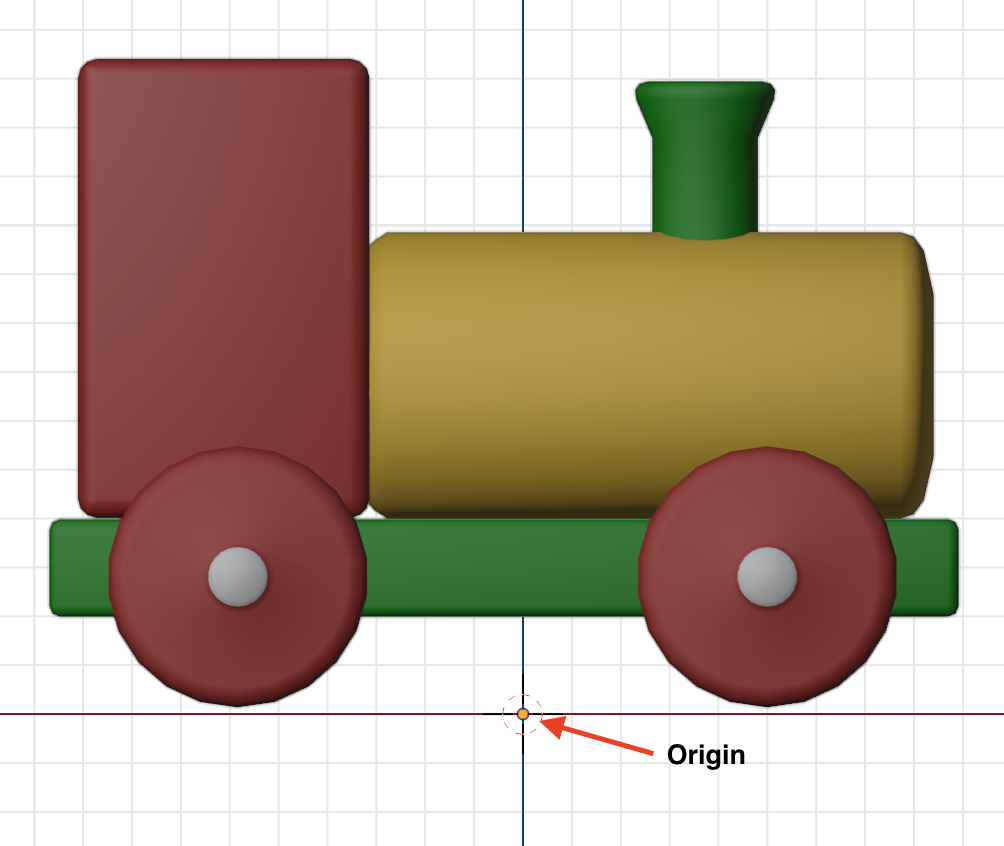
| Origin of Mesh | Metal NDC |
|---|---|
 |
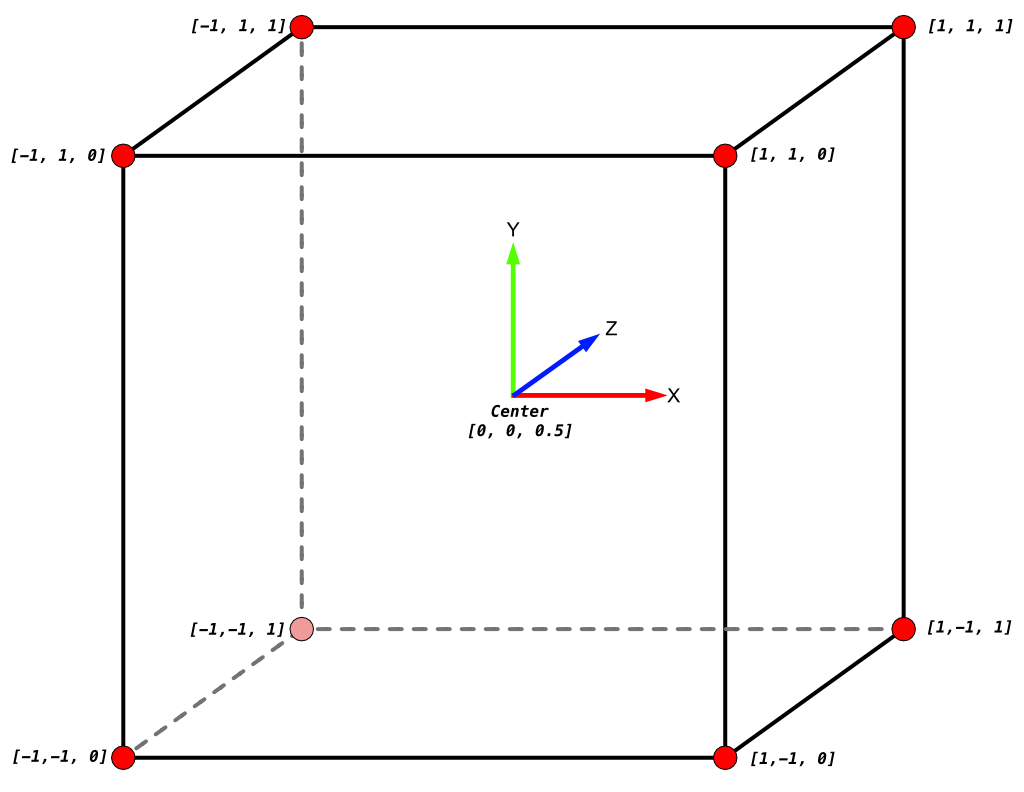 |
- Metal NDC(Normalized Device Coordinate)의 경우 [-1, 1] 이다.
Render Submeshes
for submesh in mesh.submeshes {
	renderEncoder.drawIndexedPrimitives(
		type: .triangle,
		indexCount: submesh.indexCount,
		indexType: submesh.indexType,
		indexBuffer: submesh.indexBuffer.buffer,
		indexBufferOffset: submesh.indexBuffer.offset
	)
}
댓글 남기기