
Tile-Based Deferred Rendering
카테고리: Metal
Main Reference
- Metal by Tutorials - 4th edition
Since the A7 64-bit mobile chip, Apple began transitioning to a tile-based deferred rendering(TBDR) artichecture. With the arrival of Apple Silicon on Macs, this transition is complete.
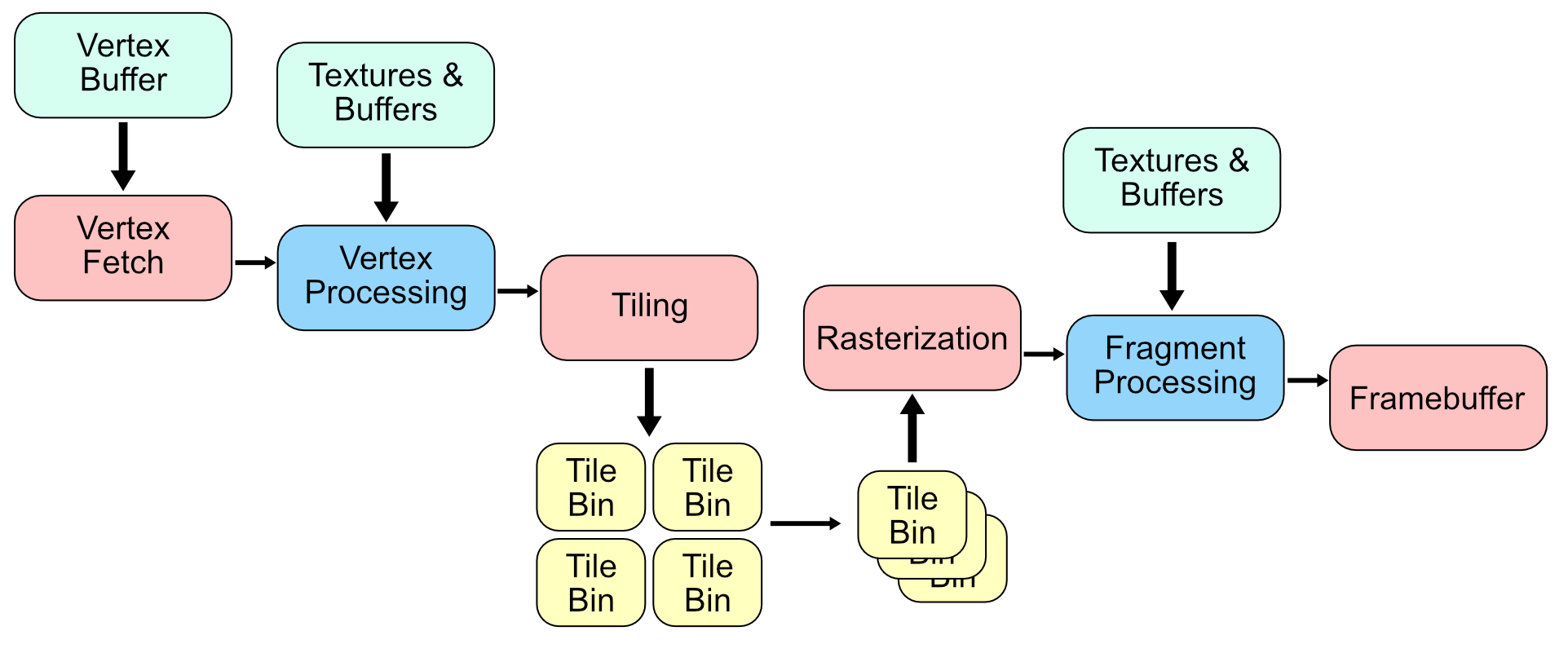
The TBDR GPU adds extra hardware to perform the primitive processing in a tiling stage. This process breaks up the sceen into tiles and assigns the geometry from the vertex stage to a tile. It then forwards each tile to the rasterizer. Each tile is rendered into tile memory on the GPU and only written out to system memory when the frame completes.
| Immediate Mode | TBDR |
|---|---|
 |
 |
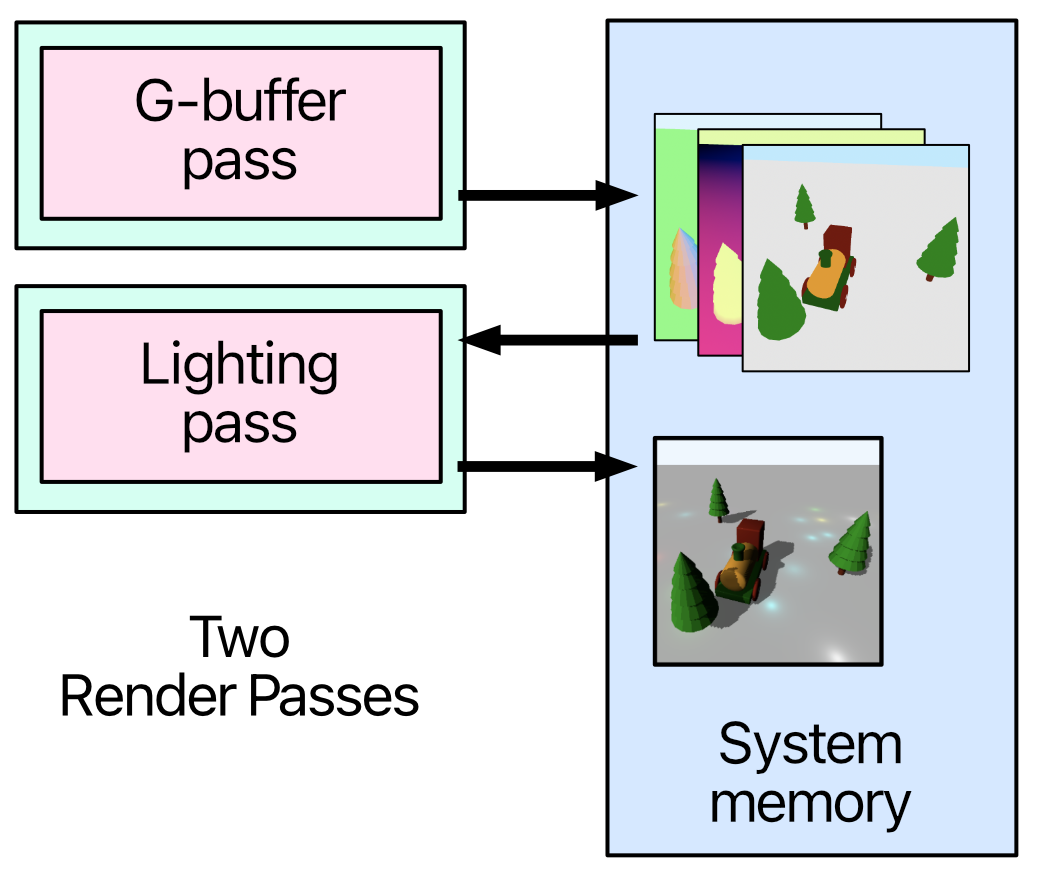
Origin Deferred Rendering Pass (Two Render Passes)
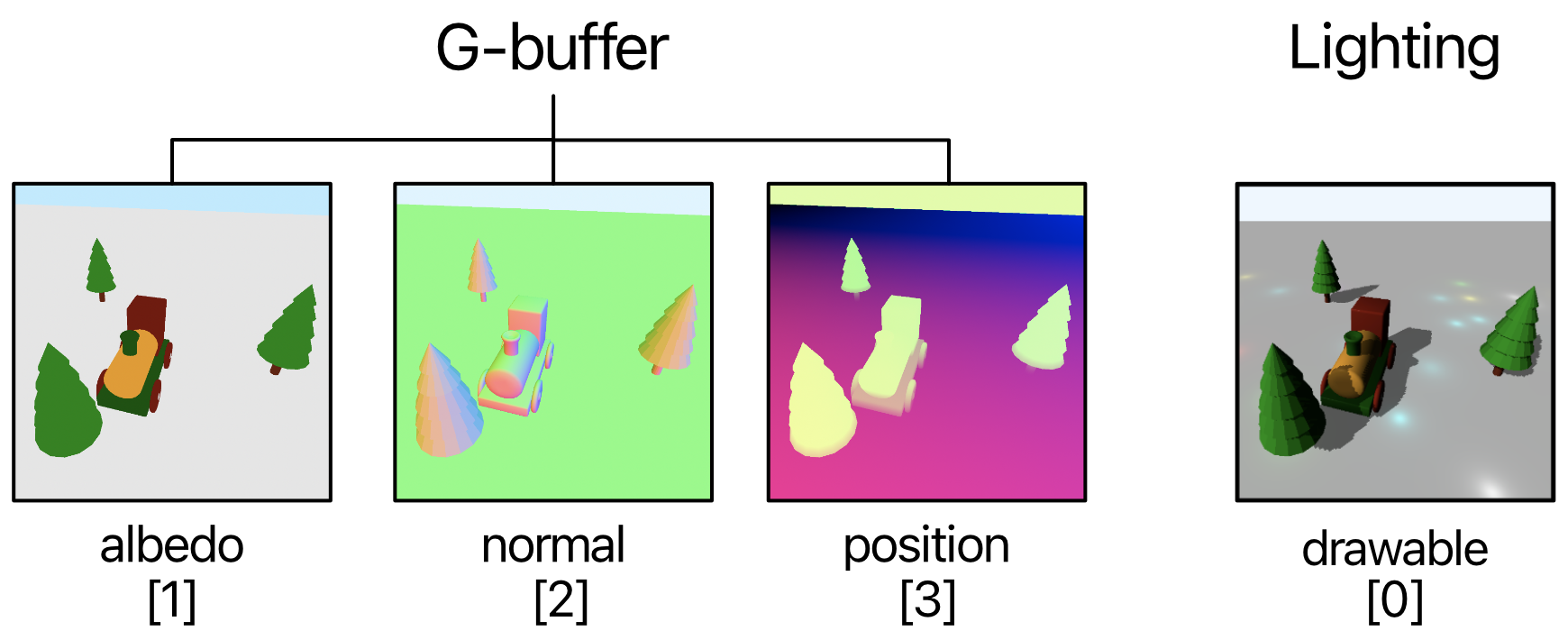
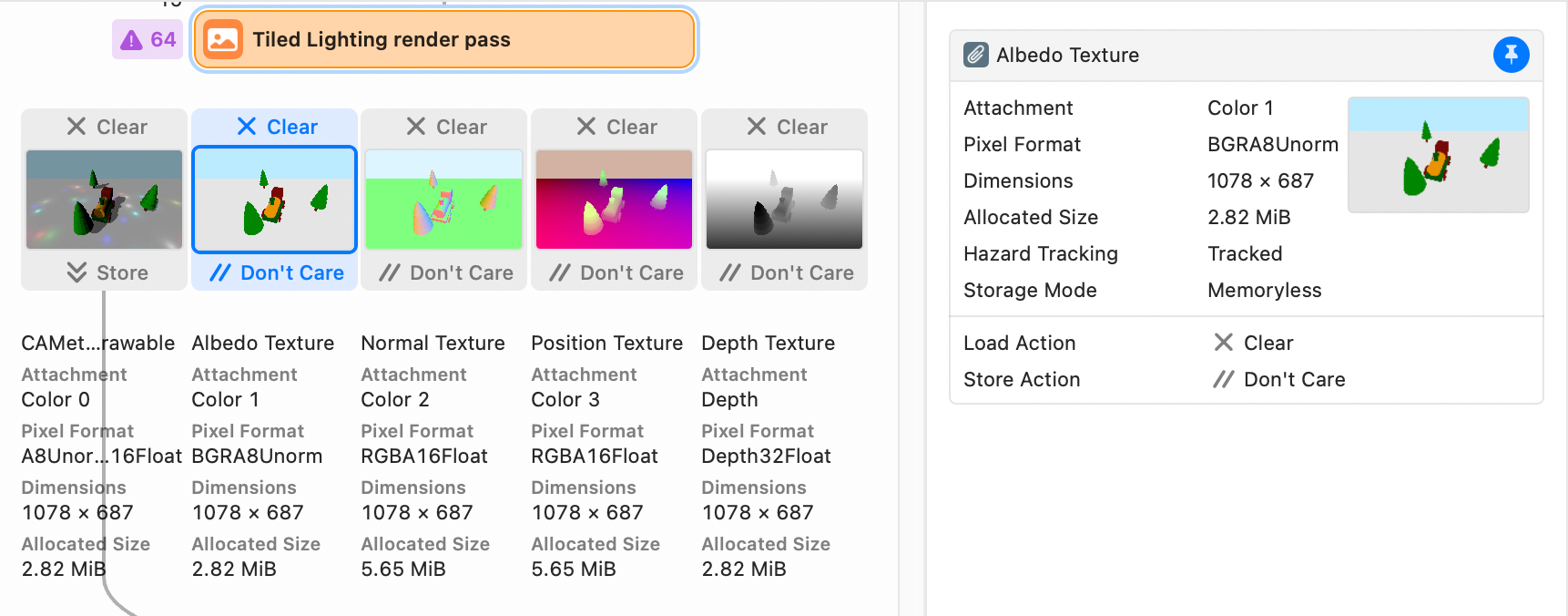
- Albedo, Normal, Position, and Depth 등 씬의 geometry 정보들을 G-Buffer에 저장
- 해당 버퍼(텍스처들)은 VRAM에 저장
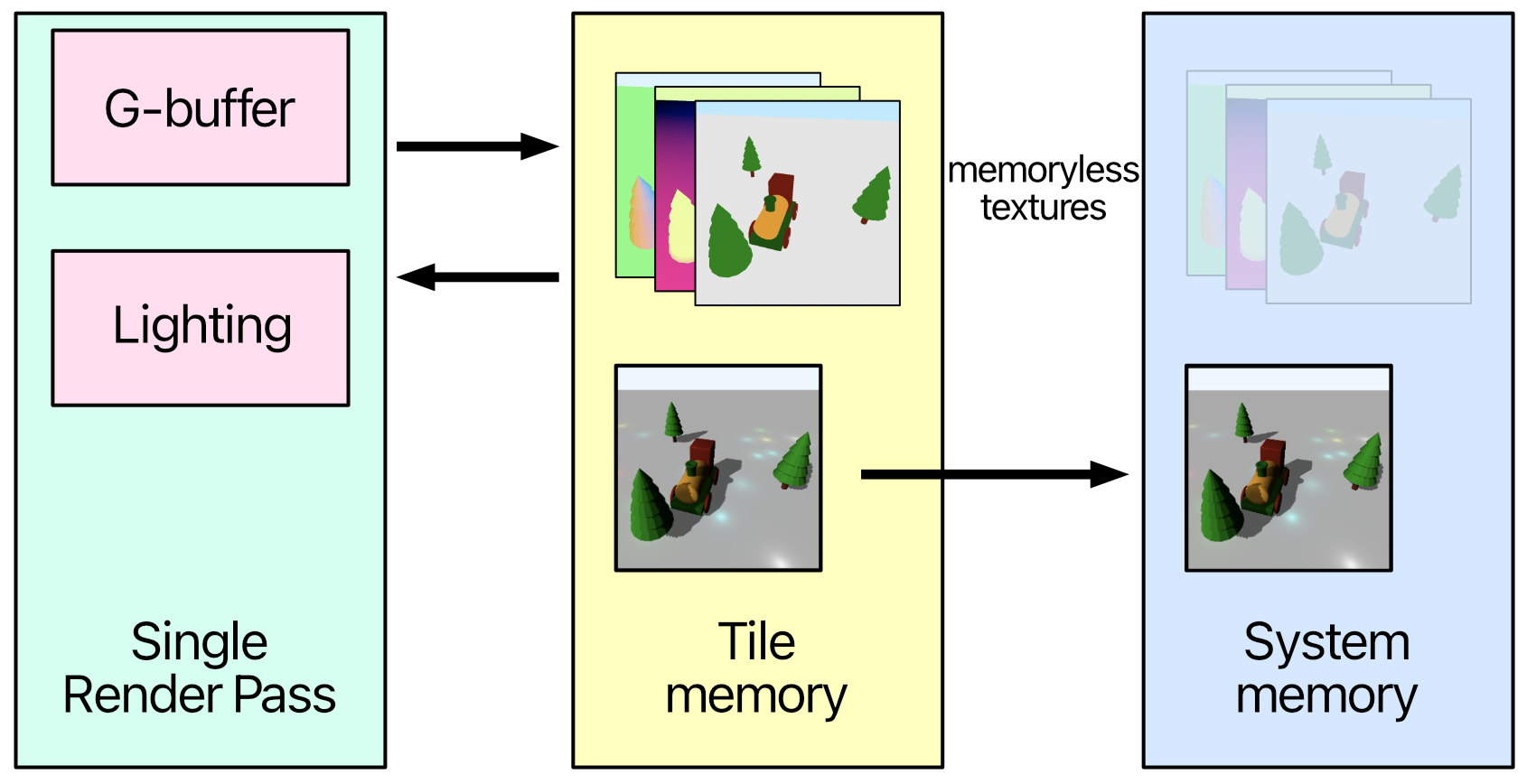
Tile-Based Deferred Rendering Pass (Single Render Pass)
- Tile Memory 라는 작고 매우 빠른 on-chip 캐시 메모리 이용
- 각 타일별로 geometry 정보들을 VRAM이 아닌 Tile Memory에 저장
- 각 타일별로 geomrtry 정보들을 바로바로 꺼내 읽어 라이팅 연산 누적
- 라이팅 연산이 완료되면 VRAM에 저장
이때 G-Buffer의 Texture들을 생성할 때 MTLStorageMode.memoryless 속성 지정
- VRAM 사용x
- Tile Memory 내에서 임시로 사용 후 내용은 버려도 괜찮음
Tile Deferred Render Pass
storageMode: .memoryless

for (index, texture) in textures.enumerated() {
		let attachment =
		descriptor.colorAttachments[RenderTargetAlbedo.index + index]
		attachment?.texture = texture
		attachment?.loadAction = .clear
		attachment?.storeAction = .dontCare
		// ...
}
- G-Buffer Texture들의 storageMode를
.memoryless로 변경 - descriptor에서 g-buffer texture들의 sotreAction을
.dontCare로 변경 - Texture 바인딩 코드 제거
fragment float4 fragment_deferredSun(
VertexOut in [[stage_in]],
constant Params ¶ms [[buffer(ParamsBuffer)]],
constant Light *lights [[buffer(LightBuffer)]],
texture2d<float> albedoTexture [[texture(BaseColor)]],
texture2d<float> normalTexture [[texture(NormalTexture)]])
{
uint2 coord = uint2(in.position.xy);
float4 albedo = albedoTexture.read(coord);
float3 normal = normalTexture.read(coord).xyz;
// ...
}
fragment float4 fragment_tiled_deferredSun(
VertexOut in [[stage_in]],
constant Params ¶ms [[buffer(ParamsBuffer)]],
constant Light *lights [[buffer(LightBuffer)]],
GBufferOut gBuffer)
{
float4 albedo = gBuffer.albedo;
float3 normal = gBuffer.normal.xyz;
// ...
}
- 기존에는 deferred pass에 따로 필요한 g-buffer texture 들을 바인딩 해야 함
- TBDR에서는 VRAM의 Texture를 읽을 필요 없이 바로 접근 가능
// TileDeferredRenderPass
let descriptor = viewCurrentRenderPassDescriptor

// GBufferPSO
if tiled {
  pipelineDescriptor.colorAttachments[0].pixelFormat
    = colorPixelFormat
}

// LightingPSO
if tiled {
  pipelineDescriptor.setGBufferPixelFormats()
}

func setGBufferPixelFormats() {
colorAttachments[RenderTargetAlbedo.index]
  .pixelFormat = .bgra8Unorm
colorAttachments[RenderTargetNormal.index]
  .pixelFormat = .rgba16Float
colorAttachments[RenderTargetPosition.index]
  .pixelFormat = .rgba16Float
}
- 렌더링 결과를 바로 drawable에 그리므로
viewCurrentRenderPassDescriptor사용 - 두 Pass를 하나로 합치기 위해 각 PSO에 colorAttachments 통합
Stencil Tests
Tile-Based Deferred Rendering의 경우 모든 타일에 대해서 lighting 연산이 누적되는 fragment function이 수행된다. Model geometry가 존재하는 타일들에 대해서만 fragment가 수행되면 훨씬 더 효율적으로 렌더링 할 수 있을 것이다. Stencil Test는 이러한 작업을 하기 위해 디자인된 기법이다. 아래 그림은 Stencil Texture의 예시인데, 간단히 말하면 model geometry가 없는 sky 부분을 마스킹한 결과이다.
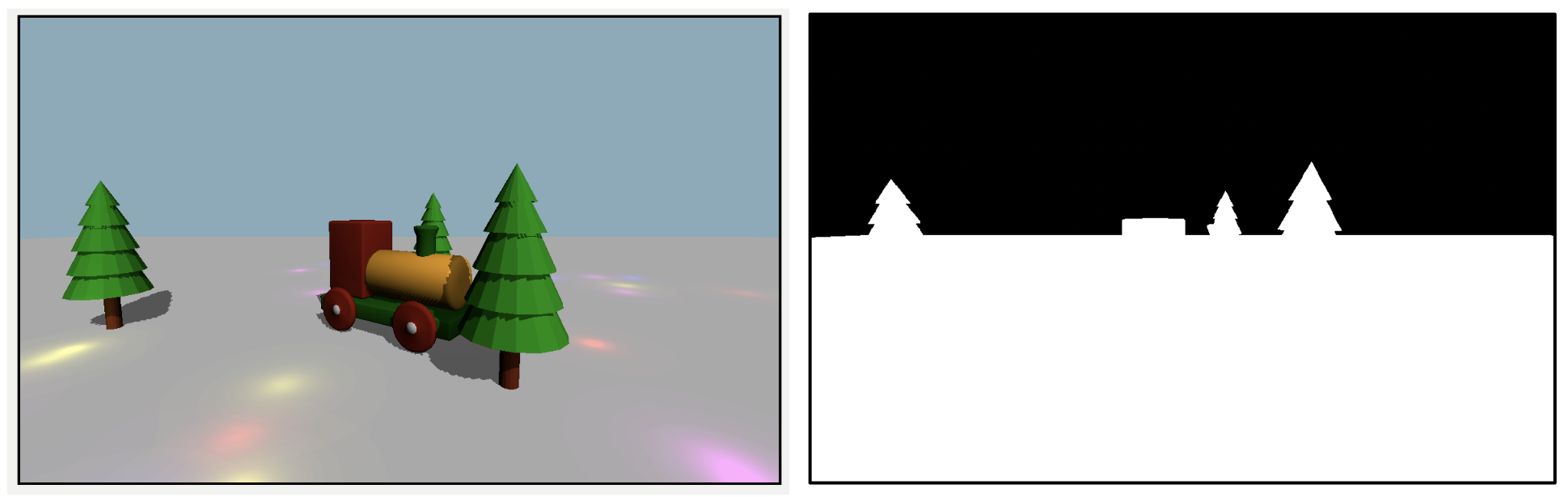
이전 Rendering Pipeline 챕터에서 rasterization 단계에서 depth testing이 진행된다는 것을 배웠는데, 이때 stencil testing을 같이 진행하면 된다. 사실 Pipeline 이름부터가 MTLDepthStencilState. Stencil Textrue는 보통 0~255(8bit)의 값으로 이루어진 pixelFormat을 가짐.
Stencil Test를 위해 필요한 세팅은 세 가지.
The Comparison Function
Stencil Test는 프로그래머가 지정한 reference value(defualt: 0) 와 Stencil Texture의 값을 비교하여 진행된다. Reference value는 render command encoder의 setStencilReferenceValue() 함수를 통해 지정할 수 있다. 비교 함수로는 equal, lessEqual, always, never, .. 등 일반적인 비교 함수들이 있다.
The Operation on Pass or Fail
아래 세 가지 경우에 대해, Test가 통과된 경우 실행하는 연산
- Stencil test failure
- Stencil test pass and depth test failure
- Stencil test pass and depth pass
Operation
.keep: 유지. 스텐실 버퍼 값 변경x(기본값).replace: 대체. 스텐실 버퍼 값을setStencilReferenceValue로 설정된 값으로 덮어씀.incrementClamp: 증가 (최댓값 제한). 값을 1씩 증가(255까지만).incrementWrap: 증가 (순환). 값을 1 증가 (255 넘어가면 다시 0으로).decrementClamp/.decrementWrap: increment 와 반대.invert: ~ (Not 비트연산)
The Read and Write Mask
Stencil Test는 용도가 매우 다양하기 때문에 8-bit 데이터를 각각 다른 용도로 사용하는 경우가 많음 이런 경우 비트마스크 방식을 이용해 간단히 해결. 예를 들어 앞 부분 4-bit는 그림자용으로, 뒤의 4-bit는 외곽선용으로 사용한다고 해보자. 이때 read mask를 00001111 로 설정하면 뒤 4-bit만 읽어올 수 있음. 마찬가지로 write mask도 활용 가능. 기본값은 11111111(255).
Stencil Texture
Stencil Texture는 Depth Texture에 추가적으로 붙어있는 8-bit 버퍼이다. Depth Buffer를 설정할 때 Stencil Texture에 대한 세팅도 지정할 수 있다.
depthTexture = Self.makeTexture(
	size: size,
	pixelFormat: .depth32Float_stencil8,
	label: "Depth and Stencil Texture"
	)

// pipeline state descriptor
pipelineDescriptor.depthAttachmentPixelFormat
	= .depth32Float_stencil8
pipelineDescriptor.stencilAttachmentPixelFormat
	= .depth32Float_stencil8

// render pass descriptor
descriptor?.stencilAttachment.texture = depthTexture
descriptor?.stencilAttachment.storeAction = .store
static func buildDepthStencilState() -> MTLDepthStencilState? {
	let descriptor = MTLDepthStencilDescriptor()
	descriptor.depthCompareFunction = .less
	descriptor.isDepthWriteEnabled = true

	let frontFaceStencil = MTLStencilDescriptor()
	frontFaceStencil.stencilCompareFunction = .always
	frontFaceStencil.stencilFailureOperation = .keep
	frontFaceStencil.depthFailureOperation = .keep
	frontFaceStencil.depthStencilPassOperation = .incrementClamp
	descriptor.frontFaceStencil = frontFaceStencil

	return Renderer.device.makeDepthStencilState(
		descriptor: descriptor)
}
frontFaceStencil affects the stencil buffer only for models’ faces facing the camera. The stencil test will always pass, and nothing happens if the stencil or depth tests fail. If the depth and stencil tests pass, the stencil buffer increases by 1.
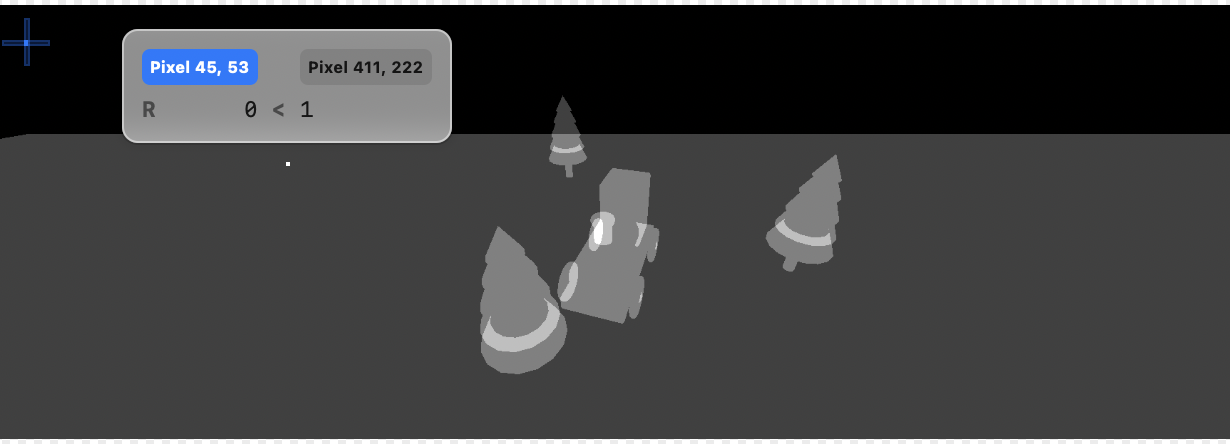
- depth testing을 통과해야 하므로 ground 먼저 렌더링 해야 함.
- geometry가 없는 부분은 값이 0으로 채워짐
// LightingRenderPass
static func buildDepthStencilState() -> MTLDepthStencilState? {
	let descriptor = MTLDepthStencilDescriptor()
	descriptor.isDepthWriteEnabled = false

	let frontFaceStencil = MTLStencilDescriptor()
	frontFaceStencil.stencilCompareFunction = .notEqual
	frontFaceStencil.stencilFailureOperation = .keep
	frontFaceStencil.depthFailureOperation = .keep
	frontFaceStencil.depthStencilPassOperation = .keep
	descriptor.frontFaceStencil = frontFaceStencil

	return Renderer.device.makeDepthStencilState(descriptor: descriptor)
}
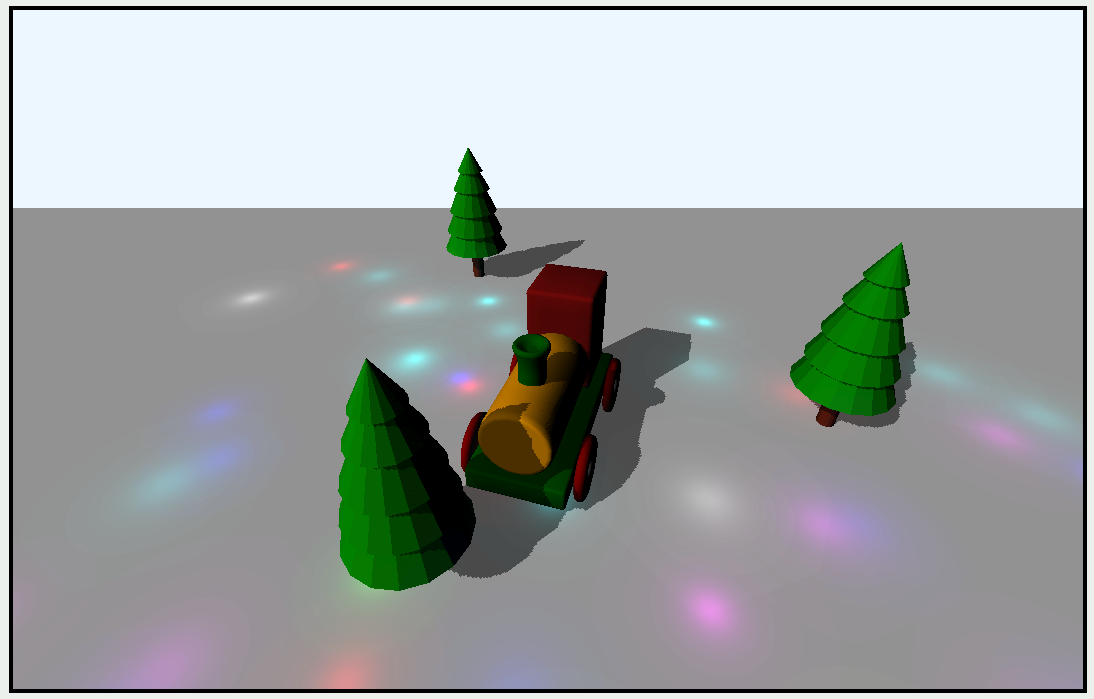
- LightingRenderPass에서
stencilCompareFunction = .notEqual로 설정 - 아무 geometry가 없는 sky 부분을 제외하면 referenceValue(0)과 not equal 이므로 stencil test 통과
Q) fragment_tiled_deferredSun 에서 GBufferOut 파라미터는 바인딩 속성 없이 받아오는데 원리가 뭐지..?
Q) image_blocks 개념이 없네
댓글 남기기