
GPU Compute Programming
카테고리: Metal
Main Reference
- Metal by Tutorials - 4th edition
Compute Processing
General Purpose GPU (GPGPU) programming uses the many-core GPU architecture to speed up parallel computation. Data-parallel compute processing is useful when you have large chunks of data and need to perform the same operation on each chunk.
In many ways, compute processing is similar to the render pipeline. You set up a command queue and a command buffer.
- In place of the render command encoder, compute coomand encoder.
- Instead of uisng vertex or fragment functions, kernel function.
- Instead of executing draw call, dispatch call.
- Threads are the input to the kernel function.
static func createComputePSO(function: String)
  -> MTLComputePipelineState {
  guard let kernel = Renderer.library.makeFunction(name: function)
  else { fatalError("Unable to create \(function) PSO") }
  let pipelineState: MTLComputePipelineState
  do {
    pipelineState =
    try Renderer.device.makeComputePipelineState(function: kernel)
  } catch {
    fatalError(error.localizedDescription)
  }
  return pipelineState
}
In Compute Pipeline State, do not need a pipeline state descriptor. You simply create the pipeline state directly from the kernel function.
만약 Compute Pass를 이용해 drawable texture에 직접 렌더링 한다면, 화면 출력 이외의 용도를 허용한다는 명령어인
metalView.framebufferOnly = false세팅이 필요함.mtkView.clearColor는 Render Pass를 위한 설정이므로, Compute Pass에는 적용되지 않는다. 따라서 Compute Pass를 통해 직접 drawalbe Texture에 그린다면 별도의 clear 과정을 적용해야 한다(ex. ClearScreenPSO).
Threads and Threadgroups
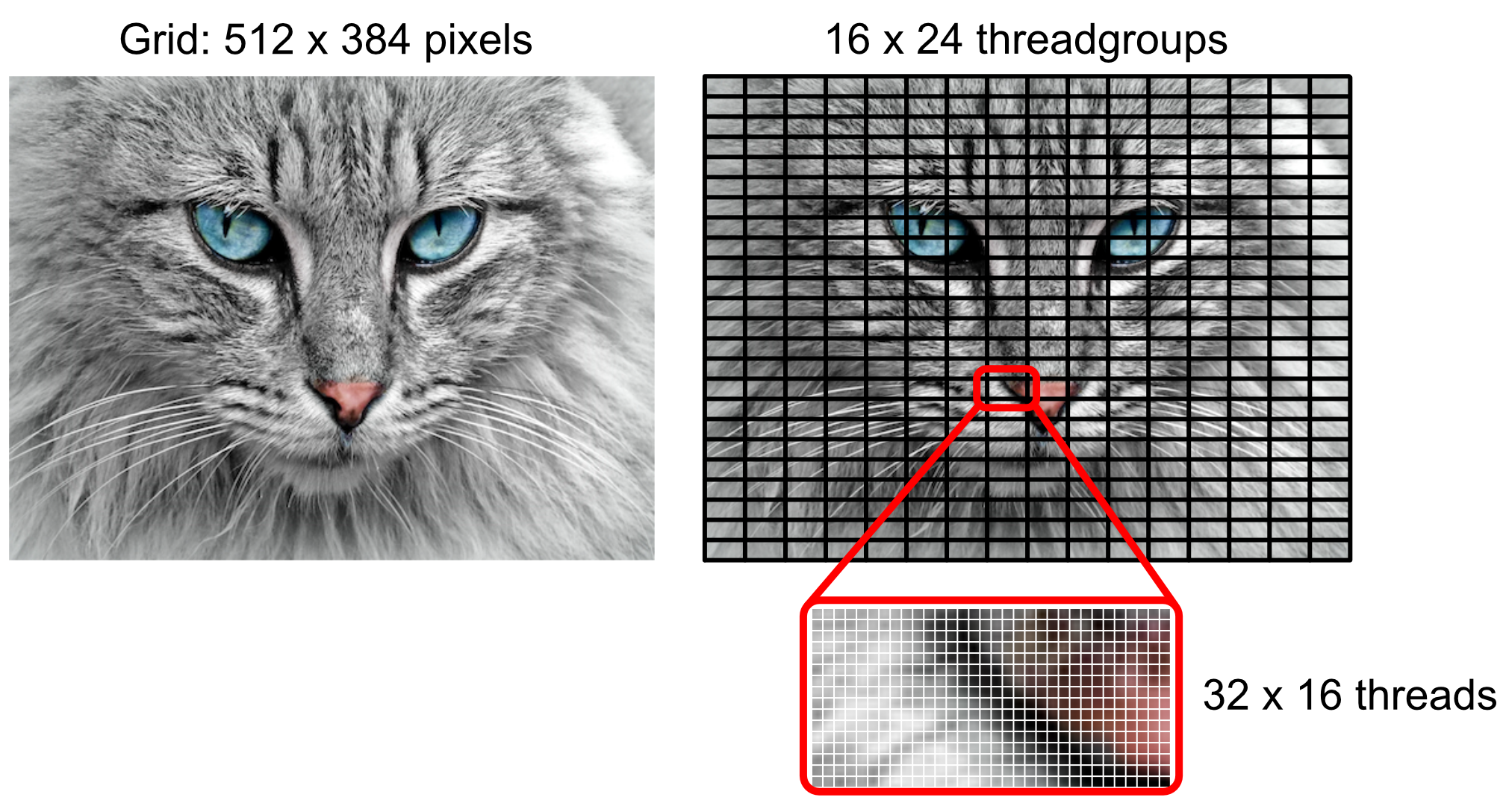
You need to tell the GPU the number of threads per grid and the number of threads per threadgroup.
- Threads per grid : 512 x 384
- Threads per threadgroup
ThreadExecutionWidth: suggests the best width for performancemaxTotalThreadsPerThreadgroup: specifies the maximum number of threads in a threadgroup
On a device with 512 as the maximum number of threads, and a thread execution width of 32, the optimal 2d threadgroup size would have a width of 32 and a height of 512 / 32 = 16. So the threads per threadgroup will be 32 by 16.
let threadsPerGrid = MTLSize(width: 512, height: 384, depth: 1)
let width = pipelineState.threadExecutionWidth
let threadsPerThreadgroup = MTLSize(
	  width: width,
	  height: pipelineState.maxTotalThreadsPerThreadgroup / width,
	  depth: 1)
computeEncoder.dispatchThreads(
	  threadsPerGrid,
	  threadsPerThreadgroup: threadsPerThreadgroup)
Uniform vs Non-Uniform Threadgroups
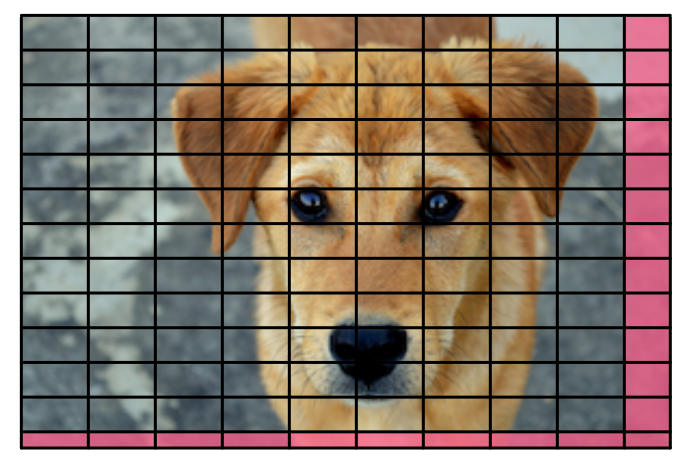
The threads and threadgroups work out evenly across the grid in the previous image example. However, if the grid size isn’t a multiple if the threadgroup size, Metal provides non-uniform threadgroups.
dispatchThreadgroups(_:threadsPerThreadgroup:)- Uniform 방식dispatchThreads(_:threadsPerThreadgroup:)- Non-uniform 방식
// 자주 사용하는 Uniform threadgroup 방식
let threadGroupCount = MTLSize(
	  width: (gridWidth + width - 1) / width,
	  height: (gridHeight + height - 1) / height,
	  depth: 1)
computeEncoder.dispatchThreadgroups(
	threadGroupCount,
	threadsPerThreadgroup: threadsPerThreadgroup)
Uniform 방식을 사용할 경우 커널 코드에 경계 검사 부분이 포함되어 코드가 복잡해진다. 하지만 thread group 내부에서 동기화 작업이 필요한 경우 uniform 방식이 필수적.
Performing Code After Completing GPU Execution
commandBuffer.addCompletedHandler { _ in
  print(
    "GPU conversion time:",
    CFAbsoluteTimeGetCurrent() - startTime)
}
commandBuffer.commit()
The command buffer can execute a closure after its GPU operations have finished.
Kernel Attributes
- thread_position_in_grid
- thread_position_in_threadgroup
- threadgroup_position_in_grid
- thread_index_in_threadgroup
- threads_per_threadgroup
- threads_per_grid
- thread_index_in_simdgroup
- simdgroup_index_in_threadgroup
- threadgroups_per_grid
Atomic Functions
kernel void atomicExample(
    device atomic_int* counter [[buffer(0)]],
    device int* data [[buffer(1)]],
    uint gid [[thread_position_in_grid]]
) {
    // 카운터 증가
    int old_value = atomic_fetch_add_explicit(counter, 1, memory_order_relaxed);

    // 최댓값 업데이트
    atomic_fetch_max_explicit(counter, data[gid], memory_order_relaxed);

    // 간소화된 버전
    atomic_fetch_add(counter, 1);
}
Atomic Operations
- atomic_load_explicit
- atomic_store_explicit
- atomic_exchange_explicit
- atomic_fetch_add_explicit
- atomic_fetch_sub_explicit
- atomic_fetch_or_explicit ( + xor, and)
- atomic_fetch_min_explicit ( + max)
Memory Order Options
memory_order_relaxed: 순서 보장 없음 (가장 빠름)memory_order_acquire: 읽기 작업에 사용, 이후 메모리 접근이 재배치되지 않음memory_order_release: 쓰기 작업에 사용, 이전 메모리 접근이 재배치되지 않음memory_order_acq_rel: 읽기-수정-쓰기 작업에 사용, acquire와 release의 조합memory_order_seq_cst: 순차적 일관성 보장 (가장 안전하지만 느림)
댓글 남기기